DiliTrust's Matter Management module lets you build Reports: a structured view of your matters that brings together table data — spends, provisions, and custom tables — across your whole portfolio, which you can filter, arrange into the columns you need, and export in a single file. This article explains what Reports are, who they are for, and how to create, refine, and export one.
⭐ Introduction
Until now, financial and operational data lived inside each individual matter. To get a cross-matter view — total spends, provisions, or legal exposure across your entire portfolio — you had to open every matter one by one and manually compile the figures into a spreadsheet. The process was slow, repetitive, and error-prone.
Reports solve this. From a dedicated Reports page, you create a report that combines your matters with one associated table (Spend, Provisions, or one of your custom tables). The result is a single flat table you can filter, adjust, and export — ready for portfolio reporting, trend analysis, and management dashboards.
In short: portfolio-wide financial reporting in one consolidated extraction, with no manual data collection.
✅ Who This Is For & What You Need
Reports are designed for finance and legal teams responsible for cross-matter reporting — especially in organisations managing legal exposure, fees, and provisions at scale.
Before you start, make sure you have:
- Access to the Matter Management module in your DiliTrust Suite. All user roles, including readers, can access the Reports page and create, view, edit, export, and delete reports. No role-based restriction applies.
- Data already recorded in your matters — for example spends, provisions, or custom table entries. Reports extract the data that already exists in your matters.
Two things are worth knowing up front:
- Reports are personal. Each user creates and can only see and access their own reports.
- Your permissions always apply. The rows inside a report are re-evaluated against your own permissions every time the report is displayed, so you only ever see the matters and records you are authorised to view. Scope counters, result rows, pagination totals, and export contents all reflect your own permissions.
☝ Creating a Report
Follow these steps to create your first report:
- Open the Reports page in the Matter Management module. If you have no reports yet, the page shows an empty state inviting you to create one — "No reports yet. Create a report to get started".
- Click Create report.
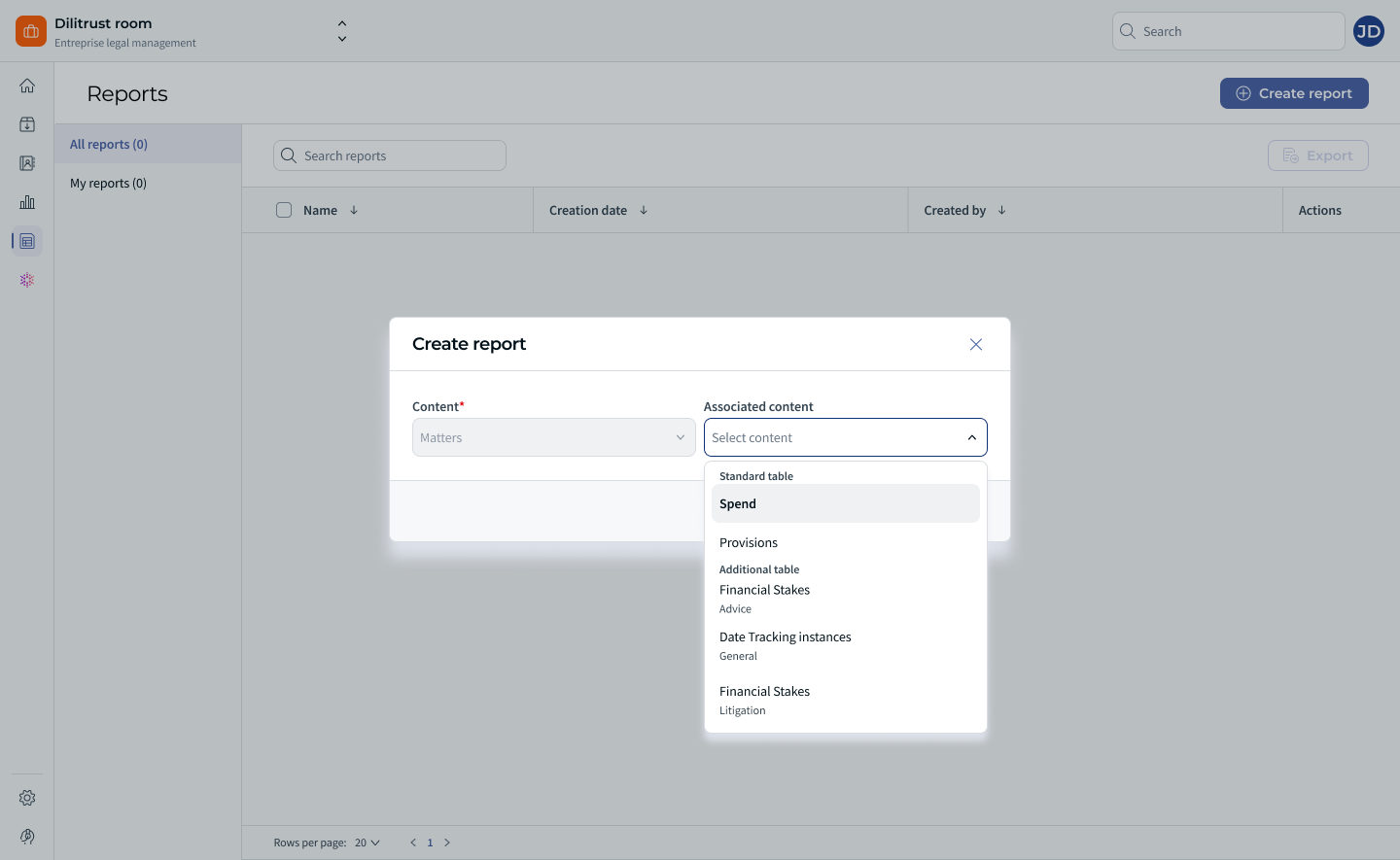
- In the Content field, you will see Matters. This field is fixed and cannot be changed: matters are the only supported starting point for a report.
- Open the Associated content menu and select the table whose data you want to extract. The menu is grouped into:
- Standard table: Spend, Provisions.
- Additional table: the custom tables configured in your environment (for example Financial Stakes, Advice, or Date Tracking instances — the exact list depends on your configuration).
- Click Next.
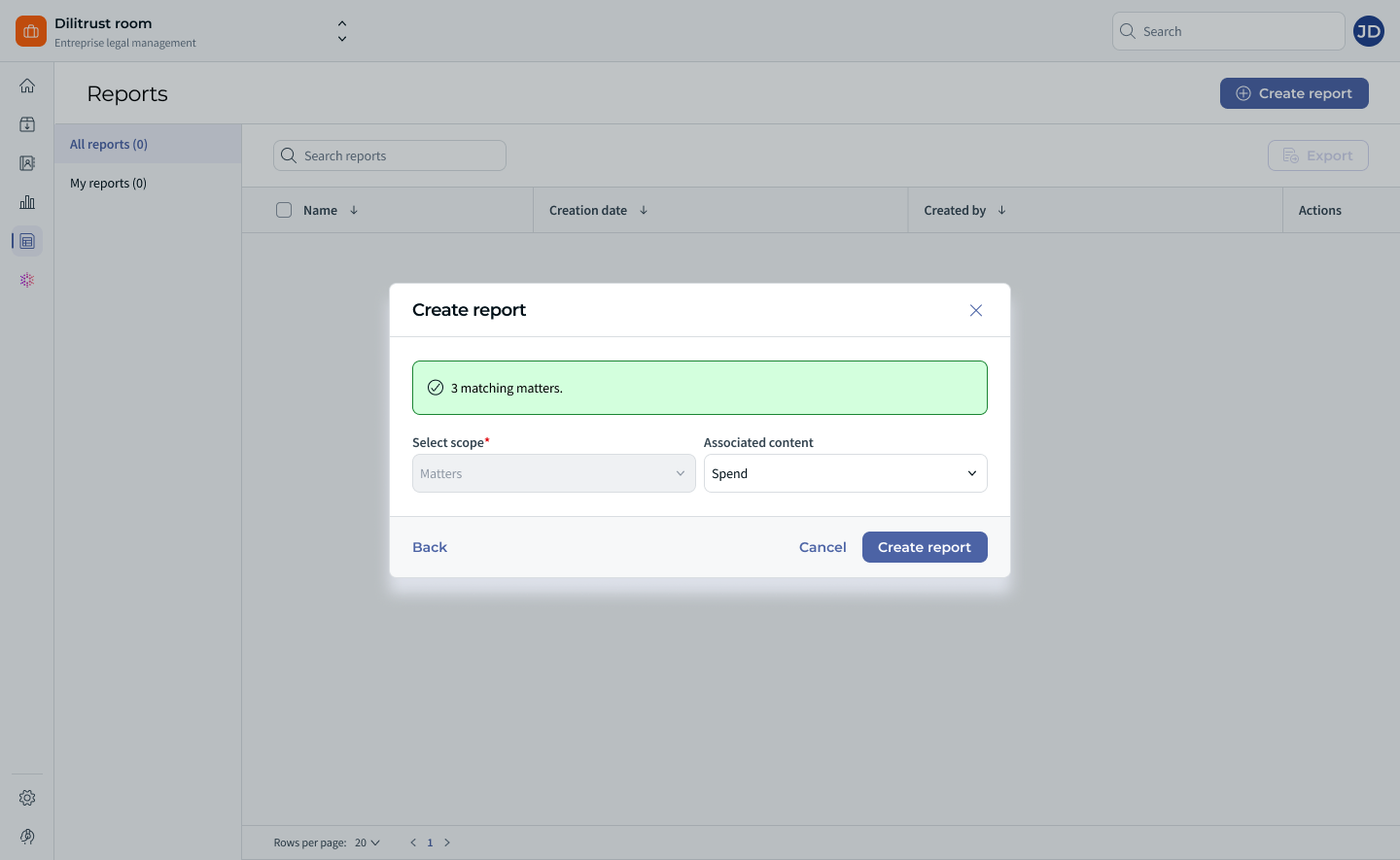
- Review the scope of your report. Select scope is set to Matters, your chosen associated content is recalled, and the number of matching matters is displayed (for example "3 matching matters."). Use Back if you need to change your selection, or Cancel to abandon the creation.
- Click Create report. A confirmation message appears — "The report was successfully created" — and you land directly on the report result view. Your new report is also added to the Reports list.
Back on the Reports page, each report row shows its Name, Creation date, Created by, and an Actions menu. The list is sorted by creation date, most recent first. The search bar filters the list by report name only, matching any part of the name regardless of capitalisation.
You can also select several reports at once from the list to export them (one file per report) or to delete them.
⚖️ Understanding Your Report Results
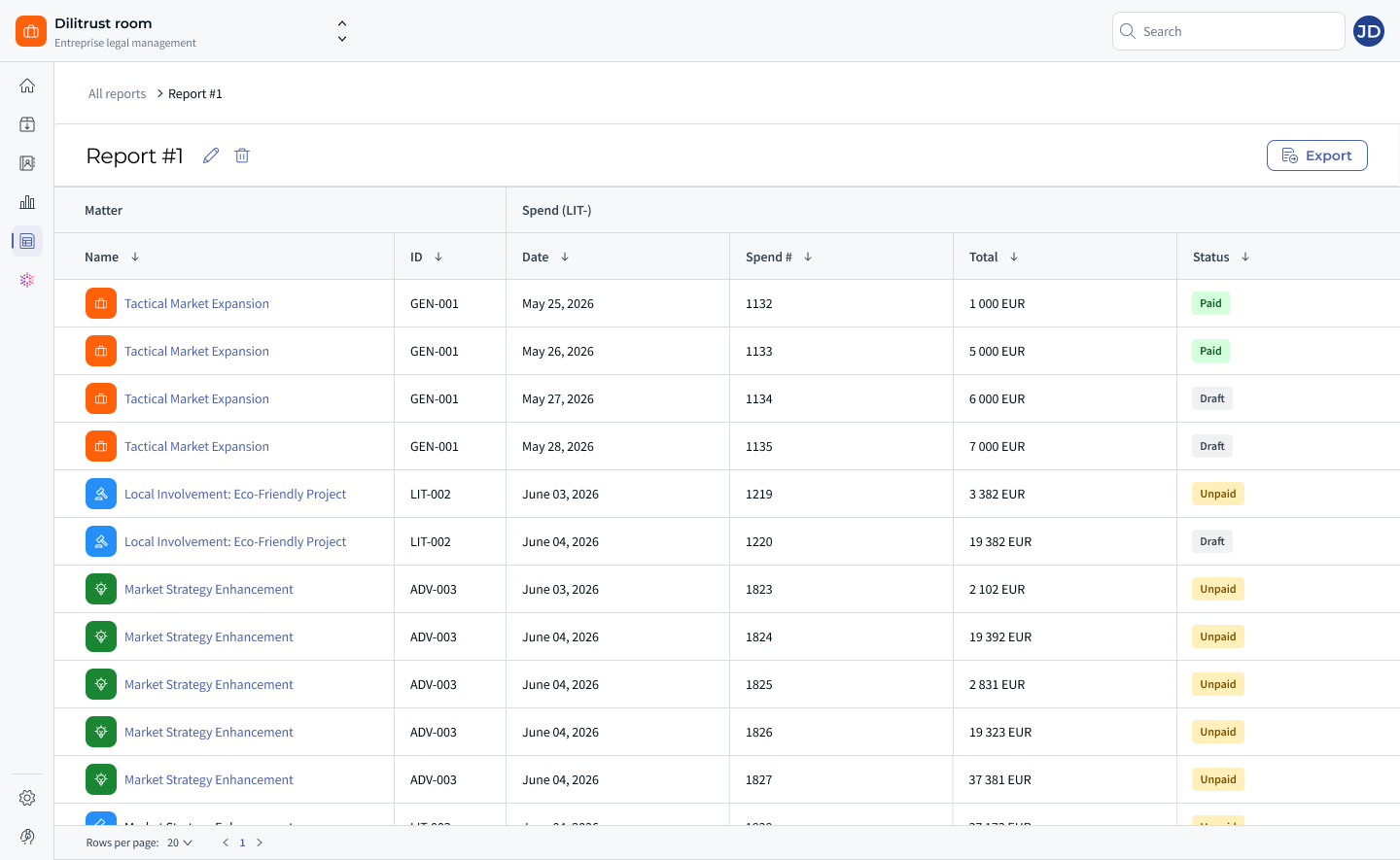
A report result is a single flat table. The breadcrumb at the top shows All reports > [your report name].
- The first columns identify the matter (Name and ID), followed by all the columns of the associated table you selected. For Spend, for example, that means Date, Spend #, Total, and Status.
- Column headers are grouped by the object they come from, so you can always tell matter columns from table columns at a glance.
- There is one row per record in the associated table. A matter with several entries — several spend lines, for instance — appears on several rows, and its name and ID repeat on each one.
- A matter with no records in the selected table still appears, as a single row with empty values in the table columns, so nothing silently disappears from your portfolio view.
- If you did not select any associated content, the report simply lists your matters using the same columns as your default matter list.
- Results are paginated, and you can change how many rows are displayed per page.
⚡ Filtering Your Report
Once your report exists, you can narrow the results down to the matters you actually want to report on.
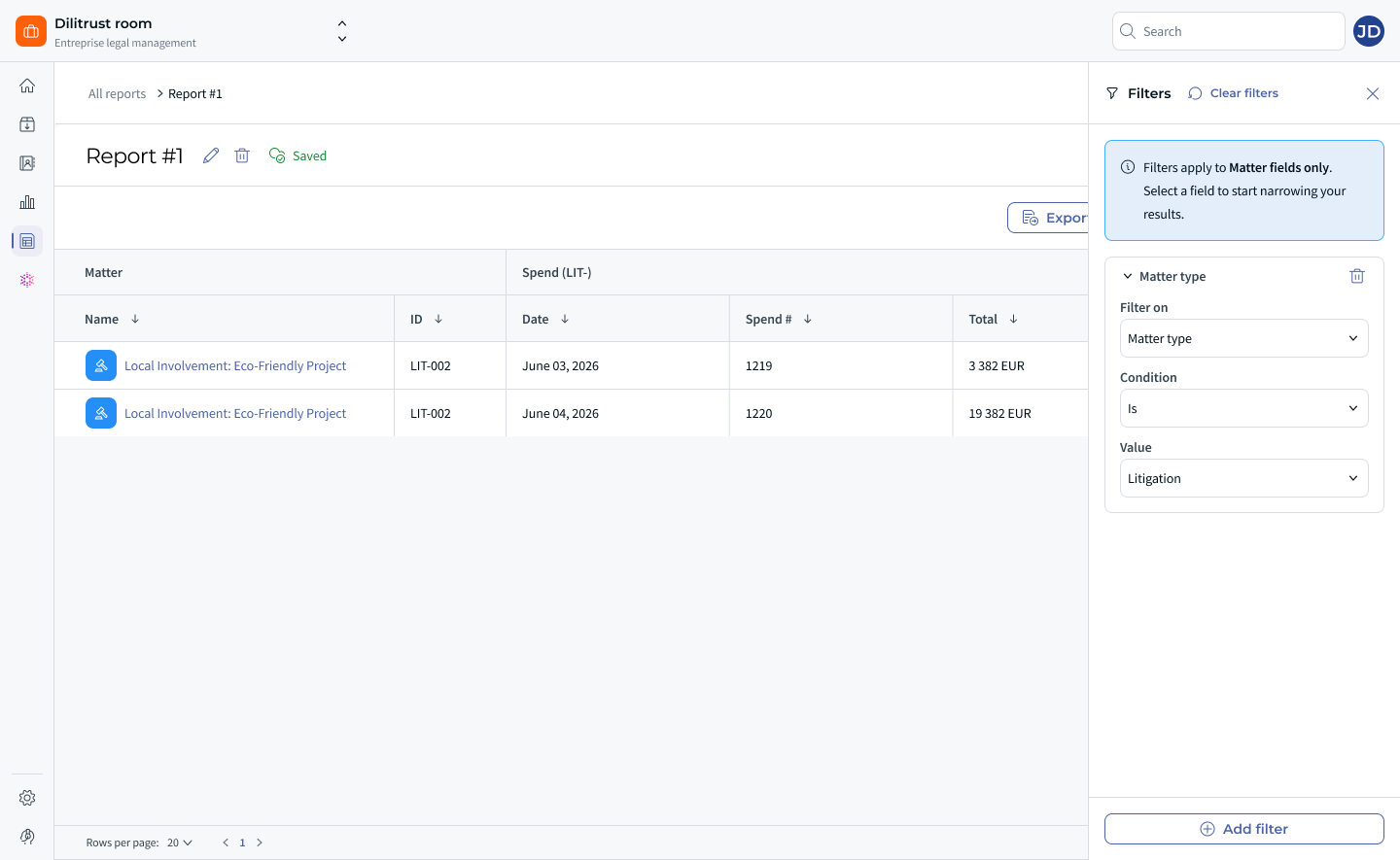
- Click Filters in the report toolbar. The panel opens with a reminder that "Filters apply to Matter fields only. Select a field to start narrowing your results."
- In the first filter row, choose a field under Filter on — for example Matter type.
- Choose a Condition (for example Is) and a Value (for example Litigation). Filters behave exactly as they do in your matter list.
- Click Add filter to combine several criteria.
The Filters button displays the number of active filters, and a Saved indicator appears next to the report title once your filters are stored. Filters are saved as part of the report definition, so reopening the report restores them. To start over, use Clear filters in the panel header — this removes every filter row and returns you to the full, permission-scoped result set.
One important boundary: you can only filter on matter-level fields. Filtering on the values inside custom table, Spend, or Provision columns is not supported, and those columns are not offered in the field selector.
✍ Choosing Which Columns to Display
You can decide exactly which columns your report shows — and therefore which columns it exports.
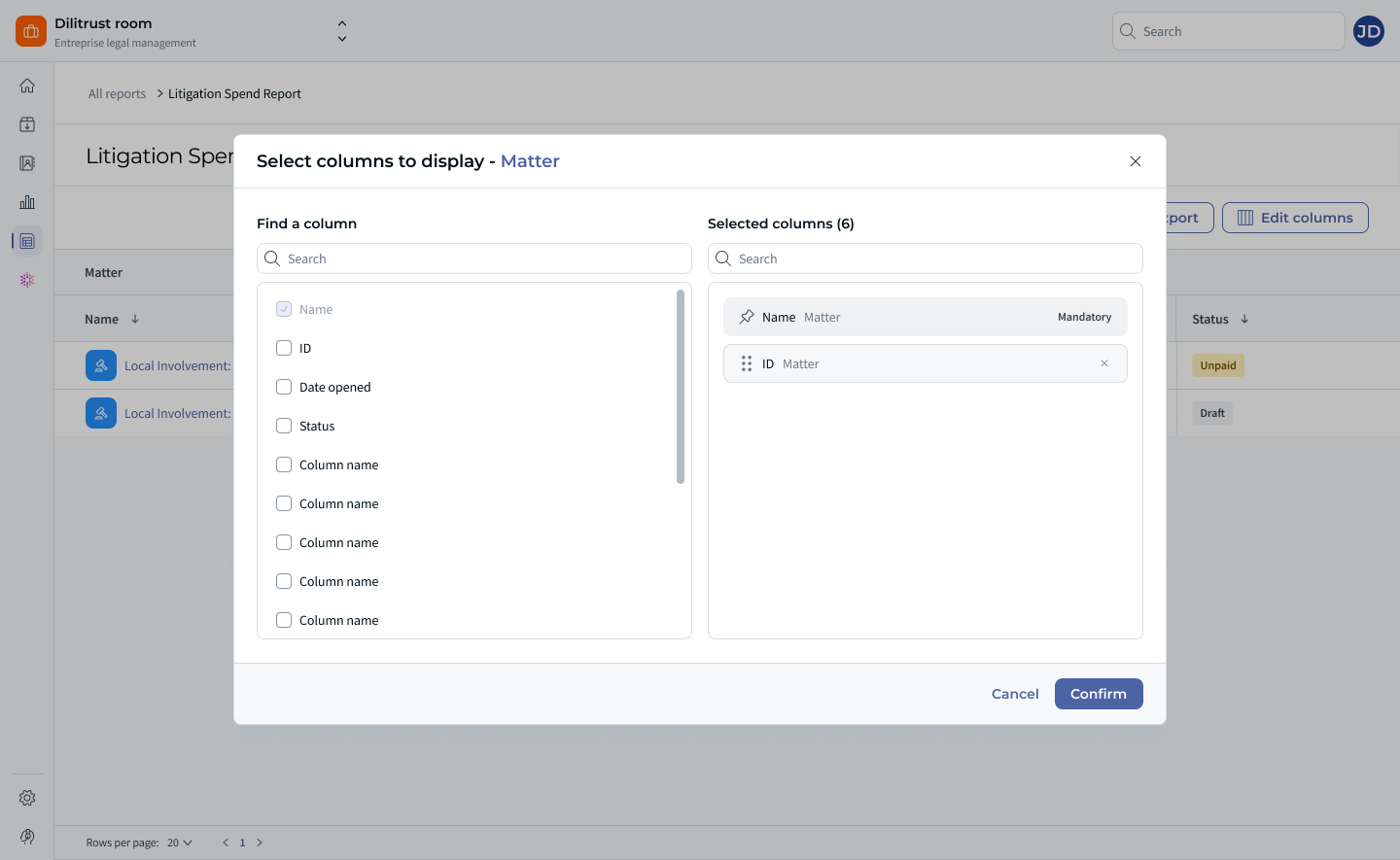
- Click Edit columns in the report toolbar to open the Select columns to display panel. It works the same way as the column selector on your matter list.
- Use Find a column to search for a column by name.
- Select or deselect columns. A Selected columns (n) counter keeps track of your choices.
- Click Confirm to apply, or Cancel to discard your changes.
A few things to keep in mind:
- Some columns are marked Mandatory. They are always included, always counted in the selection total, and their deselection control is disabled.
- You can add matter-level fields that are not displayed by default — Date opened, for example — to sit alongside your table columns.
- When two tables contain a column with the same name, the name of the parent object is shown in parentheses next to it (for example Amount (Financial Stakes)), so you always know which table a column belongs to.
- Your column selection is saved as part of the report definition and restored the next time you open the report.
The toolbar also offers a Hide empty lines toggle, which controls whether matters without data appear in your results:
- Off (default): matters with no records in the selected table are listed with empty values in the table columns.
- On: those matters are hidden, so you only see matters that actually have data.
The toggle is always reversible — switching it back off brings the empty rows straight back.
✌ Renaming a Report
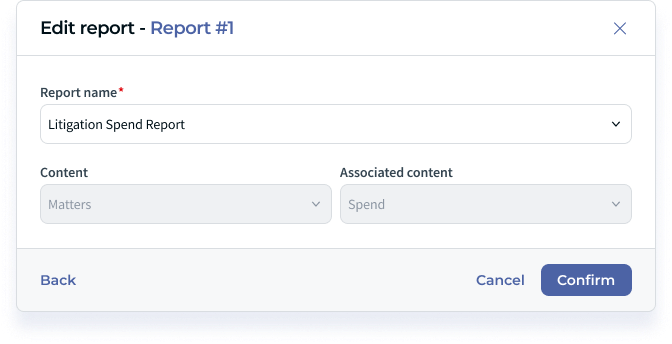
Open the edit panel for a report to adjust how it is identified:
- Report name is required and editable — this is the only element you can change after creation.
- Content (Matters) and Associated content are shown for reference but are read-only.
If you need a report on a different table, create a new report instead.
If a custom table is renamed in your environment after a report has been created, the new name is automatically carried over to the report definition and to the export — for example Amount (Financial stakes) becomes Amount (Financial Data).
⏩ Exporting Your Report
Click Export in the report toolbar to generate a file containing your report results, ready to open in your spreadsheet tool.
- In the exported file, each column name is followed by the name of its parent table, so columns stay unambiguous once the data leaves the product.
- When you have customised your columns, the export contains exactly the columns currently displayed in the report.
- Exported rows respect your permissions — only the rows you can see are exported.
- From the Reports list, you can select several reports and export them together. Each report produces its own file.
If a report or an export fails, a message indicates the general source of the problem so you know whether to retry or contact your administrator.
✨ Tips & Best Practices
- Create one report per table. A report covers a single associated table, so build a dedicated report for spends, another for provisions, and one per custom table you report on regularly.
- Give reports explicit names. Because the name is the only thing you can edit afterwards — and the only thing the search bar looks at — a clear name such as "Litigation Spend Report" pays off quickly.
- Save your filters and columns once, reuse them every month. Filters and column selections are stored in the report definition, so a report you set up carefully becomes a one-click extraction the next time.
- Run reports on a rhythm. Monthly or quarterly extractions let you track how costs, provisions, and exposure evolve over time.
- Use Hide empty lines when you only care about matters with data — and leave it off when you need the full portfolio picture, including matters with nothing recorded yet.
- Keep your custom tables consistent. The quality of a consolidated report depends on the quality and consistency of the data entered in each matter.
❗ Limitations & Known Constraints
- Matters are the only supported starting point for a report, and a report can include only one associated table.
- You cannot change the associated table of an existing report — only its name. Create a new report to report on a different table.
- Filters apply to matter-level fields only. You cannot filter on the values held in custom table, Spend, or Provision columns.
- Scheduled or recurring exports are not supported. Every export is triggered manually, from the report result view or from the Reports list.
- Reports are personal: each user only sees and accesses their own reports.
- Results and exports always reflect your own permissions, so two users opening comparable reports may legitimately see different numbers of rows.
- A matter with several records in the selected table spans several rows, which is worth remembering before counting rows as matters.
- Reports extract the records stored in your matters as they are. They do not create, estimate, or aggregate data, and they do not calculate totals.
- Custom table data is extracted as it is structured in each matter, so inconsistent table setups across matters will appear differently in the results.
❓ Frequently Asked Questions
Where do I create a report?
On the Reports page of the Matter Management module. Click Create report, choose your associated content, confirm the scope, and the report is created.
Can I build a report on something other than matters?
No. The Content field is fixed to Matters, which is the only supported starting point in this version.
Can I include several tables in the same report?
No. A report covers matters plus one associated table. Create a separate report for each table you need.
Can I change the table used by an existing report?
No. Only the report name can be changed after creation. To use a different table, create another report.
Why does the same matter appear on several rows?
Because there is one row per record in the selected table. A matter with several entries produces several rows, with its name and ID repeated on each.
Why do some matters show empty columns, and how do I remove them?
Matters with no records in the selected table are included with empty values so that your whole portfolio stays visible. Switch on the Hide empty lines toggle to exclude them.
Can I filter on the amounts recorded in my custom table?
No. Filters are limited to matter-level fields; custom table, Spend, and Provision columns are not available in the filter field selector.
Why can't I deselect certain columns?
Those columns are mandatory. They are always included in the report and their deselection control is disabled.
Two columns have the same name — how do I tell them apart?
The parent object is shown in parentheses next to the column name, both in the column selector and in the export.
Can I schedule a report to run or export automatically?
No. Scheduled and recurring exports are not supported. Each export is triggered manually.
Will I see matters I don't have access to?
No. Your permissions are applied every time the report is displayed or exported, so only the matters and records you are authorised to view are included.
Can readers create reports?
Yes. All roles, including readers, can access the Reports page and create, view, edit, export, and delete their own reports.
Was this article helpful?
That’s Great!
Thank you for your feedback
Sorry! We couldn't be helpful
Thank you for your feedback
Feedback sent
We appreciate your effort and will try to fix the article