✨ Provisions Management in Matter Management
Legal teams are required to assess and report provisions for each matter on a regular basis — often monthly or quarterly. The Provisions feature in Matter Management centralizes this process directly within each matter, eliminating manual Excel consolidation and improving reliability.
☝ What Is the Provision Feature?
The Provisions feature is a dedicated tab within a matter that allows Legal teams to:
- ✅ Assess provisions matter by matter
- ✅ Track changes over time
- ✅ Justify each variation with comments or attachments
- ✅ Report consistent and auditable data to Finance
This ensures that provision data is accurate, traceable, and aligned with financial reporting expectations.
✍ Why Use Provisions in Matter Management?
Without a dedicated tool, Legal teams often rely on spreadsheets to consolidate provisions across matters — a process that is:
- ⏳ Time-consuming
- ❌ Error-prone
- ⚖️ Difficult to justify during audits
The Provisions tab replaces this manual work with a structured, centralized approach that adds real value for both Legal and Finance.
#1 How to Active Provisions Feature?
- Go matter template settings
- Go on "feature" tab
- Active the feature for this template
? It will activate the provision only for the current matter type. You’ll need to enable it manually for each matter type where you want it active.

#2 How to Manage Provisions
- Open a matter
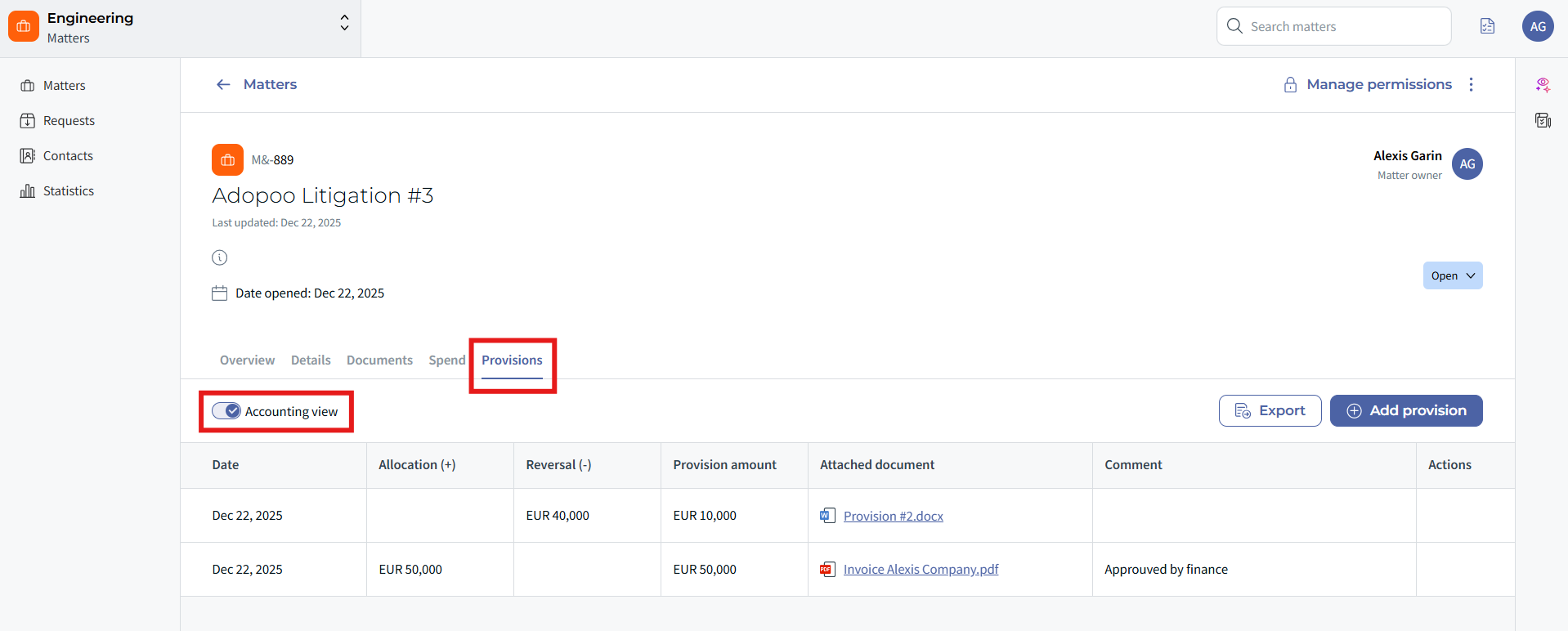
- Go to the Provisions tab.
- Enter the current provision amount for the reporting period.
- If the amount has changed, add a comment explaining the variation, and/or An attachment (e.g., analysis, correspondence)
✅ From the Accounting view, you can see the reversal between the previous and the latest provision updates.
- While you can’t change the amount or date, you can still edit the comments or attachments of a provision entry at any time.
- If you need to correct an amount, you’ll need to add a new entry with the same date and the updated value. This change will be reflected accordingly in the Accounting view.
⭐ Key Benefits
- ⚡ Faster monthly or quarterly reporting
- ⚖️ Clear justifications for every provision change
- ✍ Reduced reliance on Excel and manual consolidation
- ? Improved consistency and audit readiness
- ✅ Stronger collaboration with Finance
☝ Tips & Best Practices
- ⭐ Update provisions regularly to avoid last-minute reporting pressure.
- ✍ Always justify changes clearly to anticipate Finance or auditor questions.
- ⚖️ Use attachments for complex matters or significant variations.
❓ Things to Know
- The Provisions tab is available directly within each matter.
- Only users with appropriate permissions can edit provision data.
- Provision history remains accessible for traceability.
- This feature supports Legal assessment — final accounting treatment remains under Finance responsibility.
✨ Conclusion
The Provisions feature in Matter Management transforms a manual, low-value task into a structured and auditable process. Legal teams save time, Finance gains confidence in the data, and provision reporting becomes clearer, faster, and more reliable ⚡.
Was this article helpful?
That’s Great!
Thank you for your feedback
Sorry! We couldn't be helpful
Thank you for your feedback
Feedback sent
We appreciate your effort and will try to fix the article