✨ Matter Management Outlook Add-in
Important matter-related information often stays stuck in inboxes. The Matter Management Outlook Add-in solves this by allowing you to seamlessly link emails and attachments directly to your matters — without leaving Outlook ⚡.
This ensures that all relevant communications are centralized, searchable, and always available in the right matter.
☝ What Is the Outlook Add-in?
The Outlook Add-in connects your email workflow with DiliTrust Matter Management. It allows you to attach emails and documents to matters in just a few clicks, keeping your legal files complete and up to date.
- ✅ No more manual uploads
- ✅ No lost information in personal inboxes
- ✅ Full traceability of matter-related communications
⭐ Link Emails to an Existing Matter
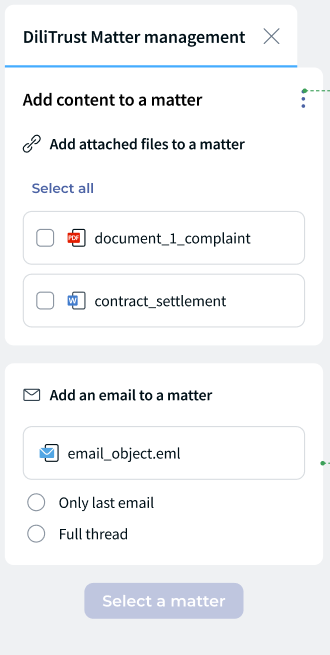
Attach an email directly to an existing matter in just a few clicks. The email content and metadata are securely stored in the matter.
You can choose to:
- Link only the latest email, or
- Link the entire email thread for full conversation context
? Attach Documents
Any file received by email (PDF, Word, Excel, etc.) can be securely linked to the matter as an attachment.
✍ How to Use the Add-in
- Open an email in Outlook.
- Click on the DiliTrust Matter Management Add-in.
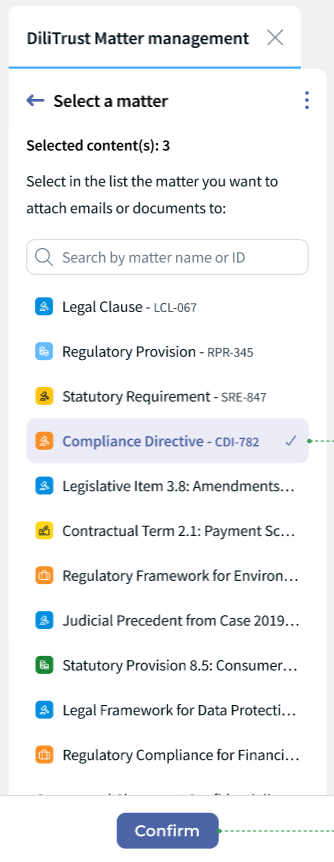
- Select the matter you want to link the email to.
- Choose whether to attach:
- The latest email only, or
- The full email thread
- Confirm to link the email and attachments.
✅ The email and documents are now securely available in the selected matter.
☝ Tips & Best Practices
- ⭐ Link emails as soon as they are received to avoid missing key information.
- ✍ Use full thread linking for negotiations or ongoing discussions.
- ⚖️ Attach documents directly from emails to maintain a complete audit trail.
❓ Limitations & Things to Know
- You can only link emails to existing matters.
- Access to matters depends on your permissions in Matter Management.
- The add-in requires Outlook to be properly configured by your IT team.
✨ Conclusion
The Matter Management Outlook Add-in bridges the gap between your inbox and your legal workspace. By linking emails and attachments directly to matters, you ensure better visibility, stronger compliance, and a smoother daily workflow ⚡.
Was this article helpful?
That’s Great!
Thank you for your feedback
Sorry! We couldn't be helpful
Thank you for your feedback
Feedback sent
We appreciate your effort and will try to fix the article