✅ Connector Overview & Benefits
The Microsoft Dynamics 365 – DiliTrust CLM Connector is a gateway developed to enable the interoperation between Microsoft Dynamics 365 (CRM) and DiliTrust Contract Lifecycle Management (CLM). By means of this Connector, CRM users can request to the CLM the creation of contracts directly from their business Opportunities page in MS Dynamics without the need to switch into another system and replicate the data of the opportunity in a form or template; users can also ask the Connector to attach a document, send the contract for validation and submit it to a signature workflow.
This connector streamlines the cooperation between the systems, saving time and avoiding errors for the Sales or Business Operation users that require the creation of contracts; while keeping the Legal Department in control of the relevant aspects of the contractual models, validation workflows and the repository of signed contracts.
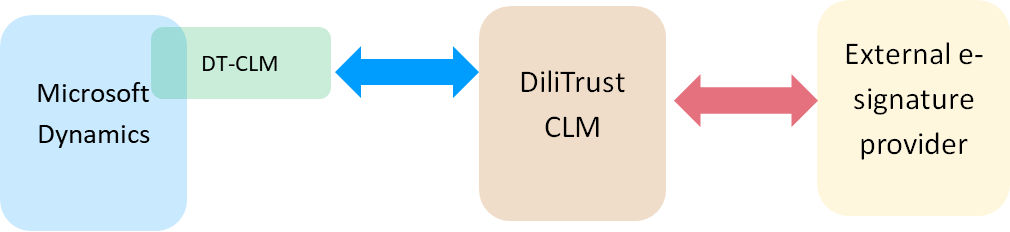
Key benefits:
- Reduce the risk of errors avoiding the need to copy data from one system into another.
- Save time minimizing the elapse of time invested to draft a standardized contract and its process until signature.
- Reinforce the Legal Department control, keeping a single repository of all the contract templates and clauses within the CLM library. Any change in a clause will be automatically available to all templates including that clause.
- Easy tracking of the status of any contract as well as benefiting from CLM consolidated statistics.
✋ Prerequisites — Before You Start
- Fields mapping: during the configuration (see below) all fields in the Contract templates of CLM must be mapped to Dynamics attributes (from objects related to the Opportunity or associated Quote).
- Signature workflow: during the configuration (see below), the signature workflow for each type of document must be specified.
- In order to use the link generated to the contract and any related information in CLM (document, workflows, status, tracking log, etc.) the user needs to have a DiliTrust CLM licence.
✌ Step-by-Step Guide — Typical Workflow
By means of this Connector CRM users can easily launch four essential tasks related to closing a business, directly from their Microsoft Dynamics tool:
- Request the creation of the contract:
The Connector allows the user to select the "type" of Contract according to the CLM contract templates available, filling in all the required information directly from the Dynamics 365 records (like Opportunity, Quote, Account, etc.). - Attach a document:
Attach to the contract a document with specific information about the agreement, e.g. the commercial proposal. - Launch the validation workflow:
Launch the validation workflow associated with the Type of Contract, making it easy to comply with the internal procedures. - Launch the signature workflow:
Launch the corresponding signature workflow for the Type of Contract selected. The Connector will take the signatories information from the Dynamics records as specified.
After any of these steps, the user is kept informed about the status of the request in the Dynamics panel together with a link to access the contract in CLM.
In the attached video you can see an example of the user experience:
✨ Installation & Configuration
The Microsoft Dynamics 365 – DiliTrust CLM Connector is built as a software plug-in for Microsoft Dynamics, therefore its deployment and configuration take place on the Dynamics 365 platform. It is supported on any recent version of Dynamics Enterprise and the latest version of DiliTrust CLM. The software package is available in Microsoft Partner Centre to facilitate the installation.
The detailed guide to carry out the installation is available in the following document:
Dynamics 365 CRM to DiliTrust CLM Connector Administrator Guide (EN • ES)
DiliTrust offers the possibility to carry out the setup and configuration of the Connector by means of Professional Services (by DiliTrust or a specialist Third Party). Please refer to your DiliTrust Product representative for further information.
Installation Prerequisites:
- Microsoft Dynamics Enterprise (sales module) version 9.0+
- Power Platform environment with Dataverse enabled
- Admin Access to Dynamics 365 and DiliTrust CLM
- Valid DiliTrust CLM API Tokens (Access and Refresh)
Configuration:
The operation of the Connector requires that both Microsoft Dynamics Enterprise and DiliTrust CLM are set up and properly configured. For example, it is not possible to proceed with the configuration of the fields mapping and the contract types in the Connector if they have not been previously configured in CLM.
- Using the Dynamics APP incorporated in the Connector, the Contract templates (downloaded from CLM) must be associated to the user "Business Unit" (in Dynamics) and the corresponding "Form Fields" mapped to the Dynamics fields.
- An Excel spreadsheet template is provided to facilitate the collection and specification of the mapping: Dynamics 365 CRM to DiliTrust CLM Connector Framework and Fields Mapping
For a complete reference about the configuration please see:
Dynamics 365 CRM to DiliTrust CLM Connector Description and Brief Guide
Configuration Prerequisites:
- Basic knowledge of Dynamics 365, Dataverse and JSON.
- Administration role in Dynamics.
- Access to DiliTrust CLM API.
◾ Limitations & Known Constraints
- Fields Mapping: Dynamics fields generated on-the-fly and multiple selection fields are not supported.
- Launch of contract requests (A) is available only from the Opportunity and/or Quote displays in Dynamics.
- All contracts are stored under a predefined folders tree in CLM according to the following convention:
/<root>/<Business Unit>/<Account>/*
❓ FAQ
Is the data exchanged between Dynamics and CLM secure?
Yes. DiliTrust CLM API uses HTTPS-secured connections for all interactions between the systems.
Can I customize the contract templates?
Yes. Admins can edit and update the Contract Templates in CLM including the custom attributes as needed. All these changes will be automatically uploaded to the Connector.
What happens if a user lacks one of the roles?
The corresponding UI actions (e.g., "Request Contract") will not be visible or actionable.
How often is data synchronized?
Contract Template sync occurs once daily. If new fields are included that are not mapped, the Contract type status is changed in the Connector to warn that changes are needed in the configuration to map the missing fields. Contract statuses are updated via webhook in real-time.
What are the licensing terms?
The licence of use of the Microsoft Dynamics 365 – DiliTrust CLM Connector is linked to the availability and activation of the corresponding Microsoft Dynamics and DiliTrust Governance CLM licences. It is a DiliTrust extension of the DiliTrust service and, as such, is provided under the standard DiliTrust Service Terms and Conditions.
⌛ Changelog & Media
Version: 2.5 | Release Date: February 2026
- Initial public release of Dynamics 365 Connector.
- Includes support for contract creation, validation, and e-signature flows.
- Embedded JSON-based mapping for custom templates.
- Enhanced CLM Template updates detector: Connector mapping status responds to unexpected updates in Templates not properly mapped in the Connector.
Screenshots & Videos — Sales material available:
- Dynamics 365 CRM to DiliTrust CLM Connector One Pager
- Video Demo (EN • ES)
Was this article helpful?
That’s Great!
Thank you for your feedback
Sorry! We couldn't be helpful
Thank you for your feedback
Feedback sent
We appreciate your effort and will try to fix the article